
Release 9.0 - Fully Native on iOS and Android
 PK
Peter Klimek
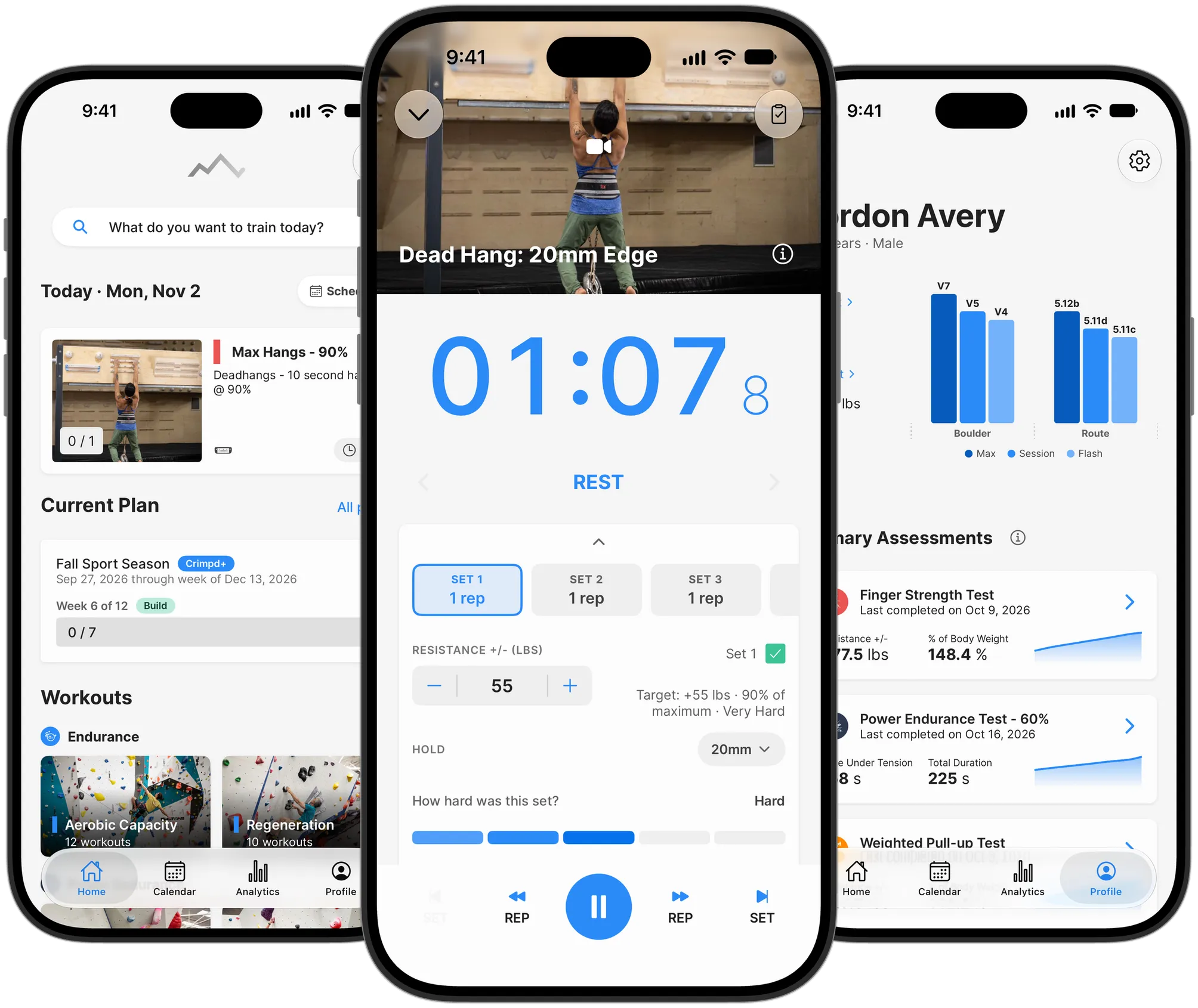
Version 9 is a much bigger release than usual. The iOS and Android apps are now fully native, and since that meant rebuilding every screen anyway, we took the opportunity to check off a long list of features that have been sitting on our wishlist. This post covers what's new. We'll save how it's built for a separate, more technical post.
The rollout has started on the App Store and Google Play, and it's on schedule to reach everyone by early next week. The web app update should go out this weekend.
Native on iOS and Android
Until now, the Crimpd app on your phone was our web app running inside a native wrapper. In 9.0 every screen, sheet, picker, and alert is built with Apple's and Google's own toolkits, along with the workout timer, the mini player, and the video player.
In practice the app launches faster and behaves more like the rest of your phone. You can drag to reorder lists, swipe a set left to delete it, and long-press for more options. The app also comes back where you left it. If your phone closes Crimpd in the background, reopening it returns you to the same tab and screen, with any open editor and its unsaved changes still there, and your minimized workout too.
iPads and Android tablets get their own layouts, with a sidebar for navigation, a three-pane calendar, and a side-by-side timer in landscape. The web app at my.crimpd.com gets the same redesign and runs the same training logic as the phones, so all three should behave the same way.
There's enough to say about the iPhone Duo and tablet layouts for a separate post.
Calendar
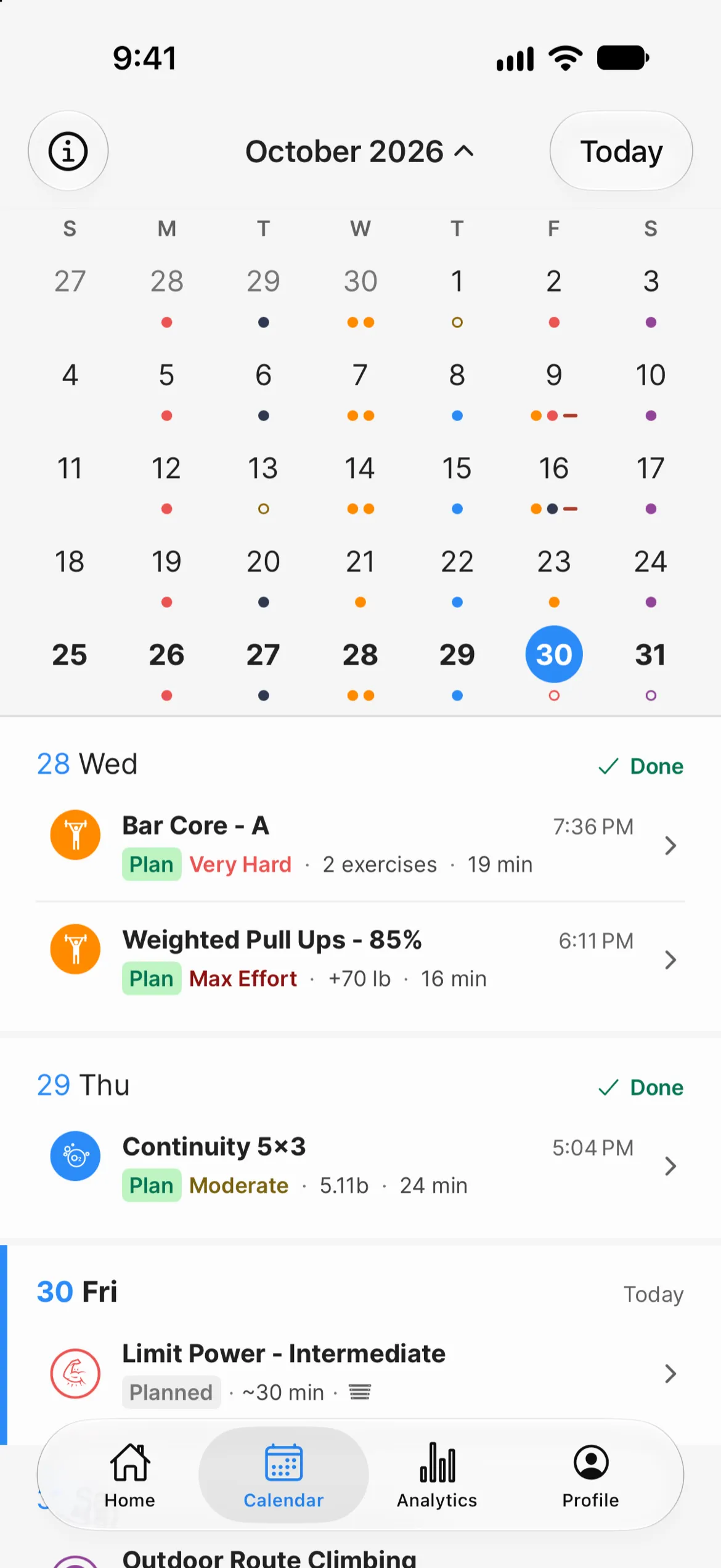
The Logbook tab is now called Calendar. It shows one week at a time, you swipe between weeks, and the week strip expands into a full month when you want to look further back. Each day gets a dot per workout, colored by workout type, and the dot shows whether the workout was done, partly done, or missed.
If you're following a training plan, its workouts show up here next to your logs as planned or missed. A missed workout has a "Log for" option on its row, so you can log it against the day it was meant for.
Analytics
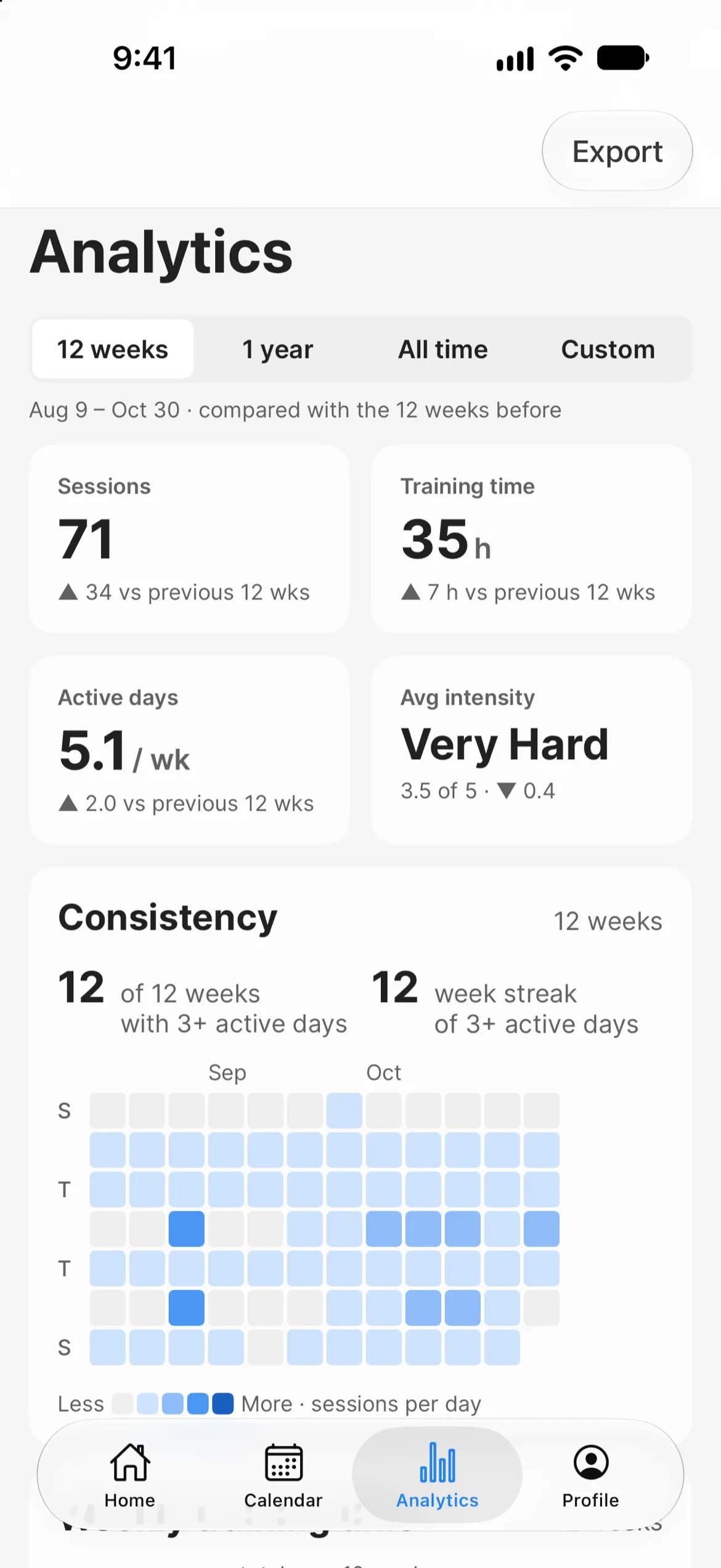
We said over the summer that a revamped Analytics screen was coming this fall, and this is it. A period selector at the top (12 weeks, 1 year, all time, or a custom range) applies to every card on the screen. Below that:
- Summary tiles for sessions, training time, active days per week, and average intensity, each compared with the previous period.
- Consistency, which counts a week as active when you trained on three or more days and tracks your streak of those weeks.
- Climbing sends and attempts by grade, shown in your own grade scale. You can filter by the tags we added in 8.3, so you can look at just your board climbing, or just outdoor routes.
- Strength by exercise, with an option to filter by workout.
Press and drag across any of the line charts to read off individual values.
Workout history and charts
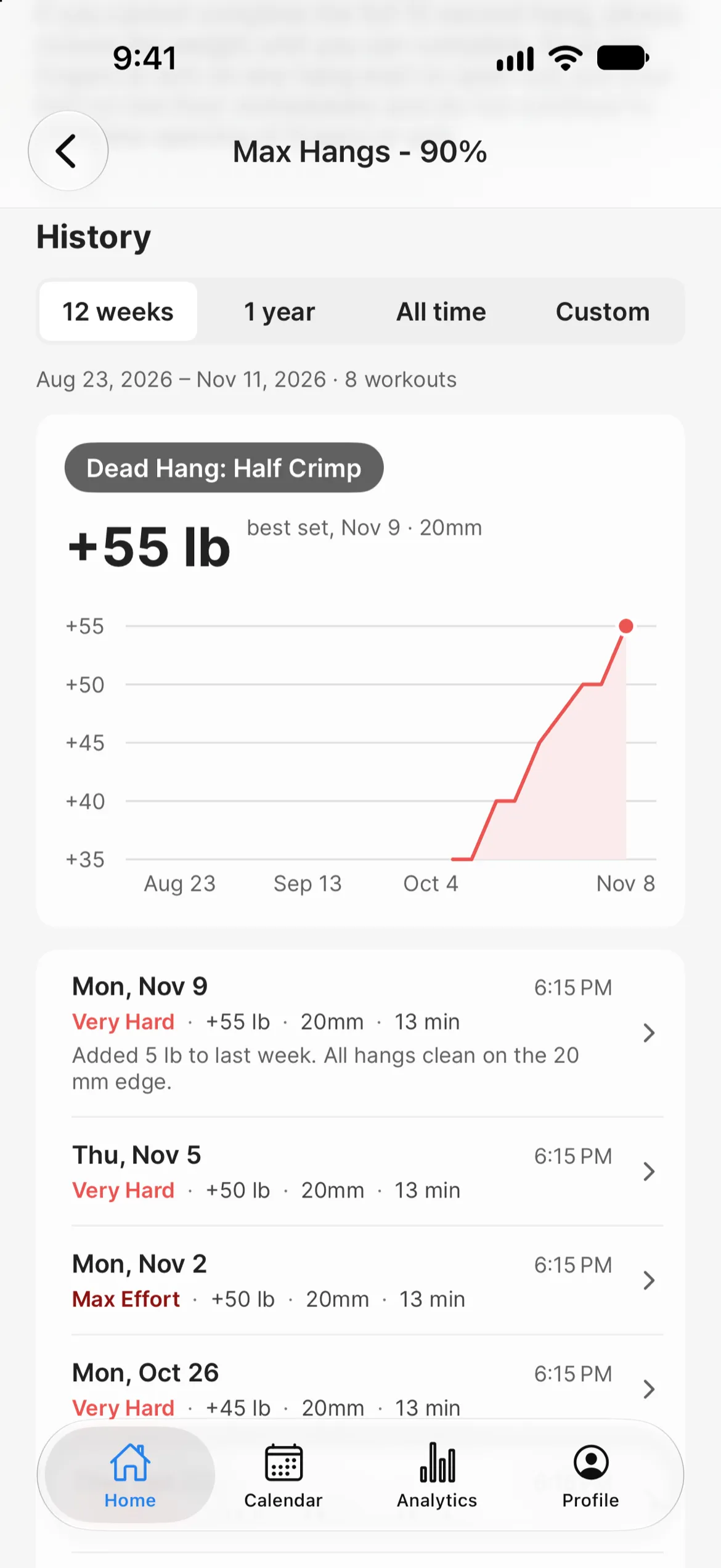
Every workout's details page now has a History section. It charts your results for that workout over a date range you pick and lists each session you've logged underneath. If you want to know what weight you used for max hangs three weeks ago, it's on the same screen as the Start Workout button. Assessments have the same history and chart layout.
Varying sets, unilateral exercises, and custom exercises
These three have been requested for a long time, and they all live in the custom workout editor.
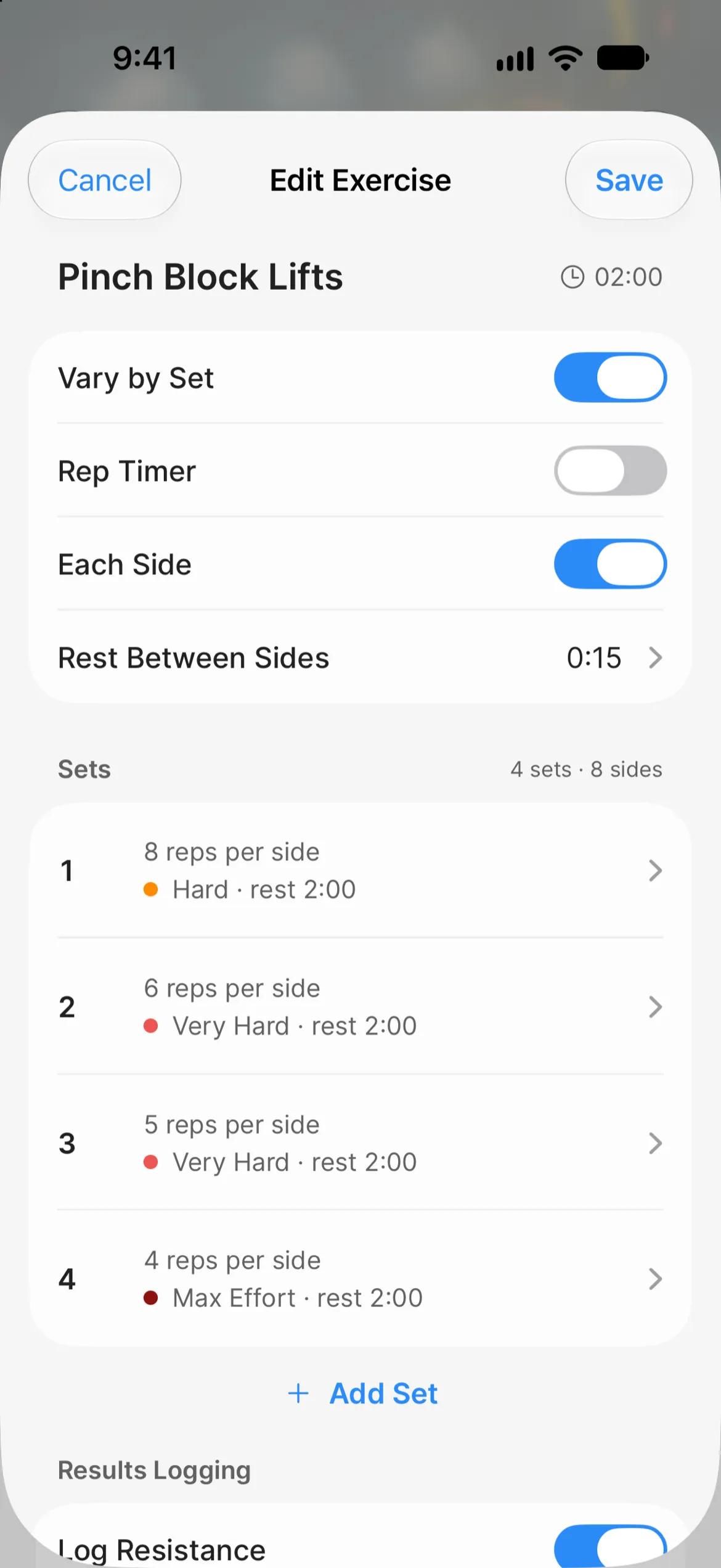
Varying sets. Each set in an exercise can have its own reps, work time, rest, and intended effort, so pyramids and ramping warm-up sets can be written as a single exercise. The timer follows along with the right rep count for each set.
Unilateral exercises. Mark an exercise as Each Side and the timer runs each set one side at a time, labels the left and right sides, and prompts you to switch. You can also set a rest between sides. Sets read as "5 reps per side" in the workout and in your log.
Custom exercises. You can create your own exercises and find them again under a My Exercises filter. If you rename one, the new name shows up everywhere it's been used, including your Analytics charts.
A related smaller change: edge exercises now record the hold you used (20 mm, for example), and it carries through to your logs, history, and charts.
Training plans
The Training Plans tab is gone, and your plan now lives at the top of Home. You'll see today's plan workouts first, then your current plan with its week and progress, with the rest of your plans one tap away.
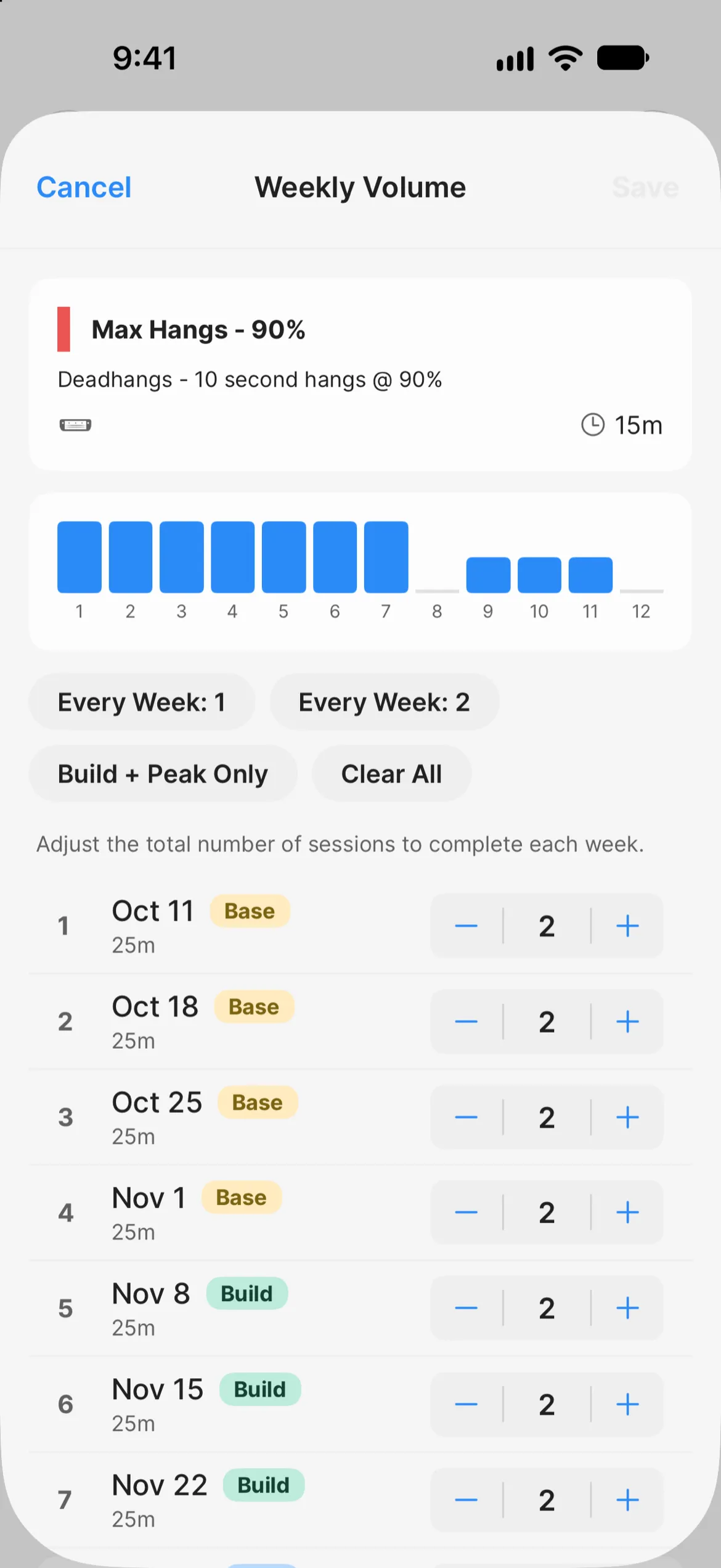
The plan builder was rebuilt as well. Each week has a volume chart, a phase (Taper is new), notes, and options to copy or clear the whole week. Changes save as you make them, with Undo if you slip. On iPads, Android tablets, and the web you get a table view for editing the whole plan at once.
One thing to be aware of: we changed how a logged workout gets matched to your plan. A log counts toward its own day first, then the nearest earlier slot you missed, then your anytime workouts, then the nearest upcoming slot. That means a log in a plan you've already started may tick a different day than it did in version 8.
Offline logging
When we shipped 8.0 we said full offline support wasn't there yet. Logging now works without a connection. A log saved offline is queued and synced once you're back online, and until then it shows as "Not synced" with a Retry button. Queued logs expire after a week, so do open the app with a connection before then. The plan builder is still read-only offline.
Logging in is now required
This is the one change we'd rather not be making. You now need to be logged in to use Crimpd, both in the apps and on the web. AI scraping agents have become aggressive enough that leaving the app open to logged-out visitors stopped being workable, so we've closed it off.
Accounts are still free, and signing up only asks for an email and a password (usernames are gone). Shared links still work; they just open after you log in.
Before you update
- Version 9 requires iOS 18 or Android 10, or later.
- If you're updating from a version older than 8.6, you'll be logged out once and will need to sign back in.
- The tabs are now Home, Calendar, Analytics, and Profile.
A rewrite of this size is going to have bugs we haven't found. We've already put out three fix releases since 9.0.0, including one for a crash when opening Settings on iOS. If something looks wrong or a feature you relied on has gone missing, please let us know at support@crimpd.com.
-pk
About the author
PKPeter Klimek
Co-founder & Developer
Peter is the co-founder of Crimpd and the CTO of Lattice Training. He builds training tools for climbers who want to get stronger without guesswork. When he's not working, he can be found building trails and developing new boulders in the Pacific Northwest.